Bring your own registry
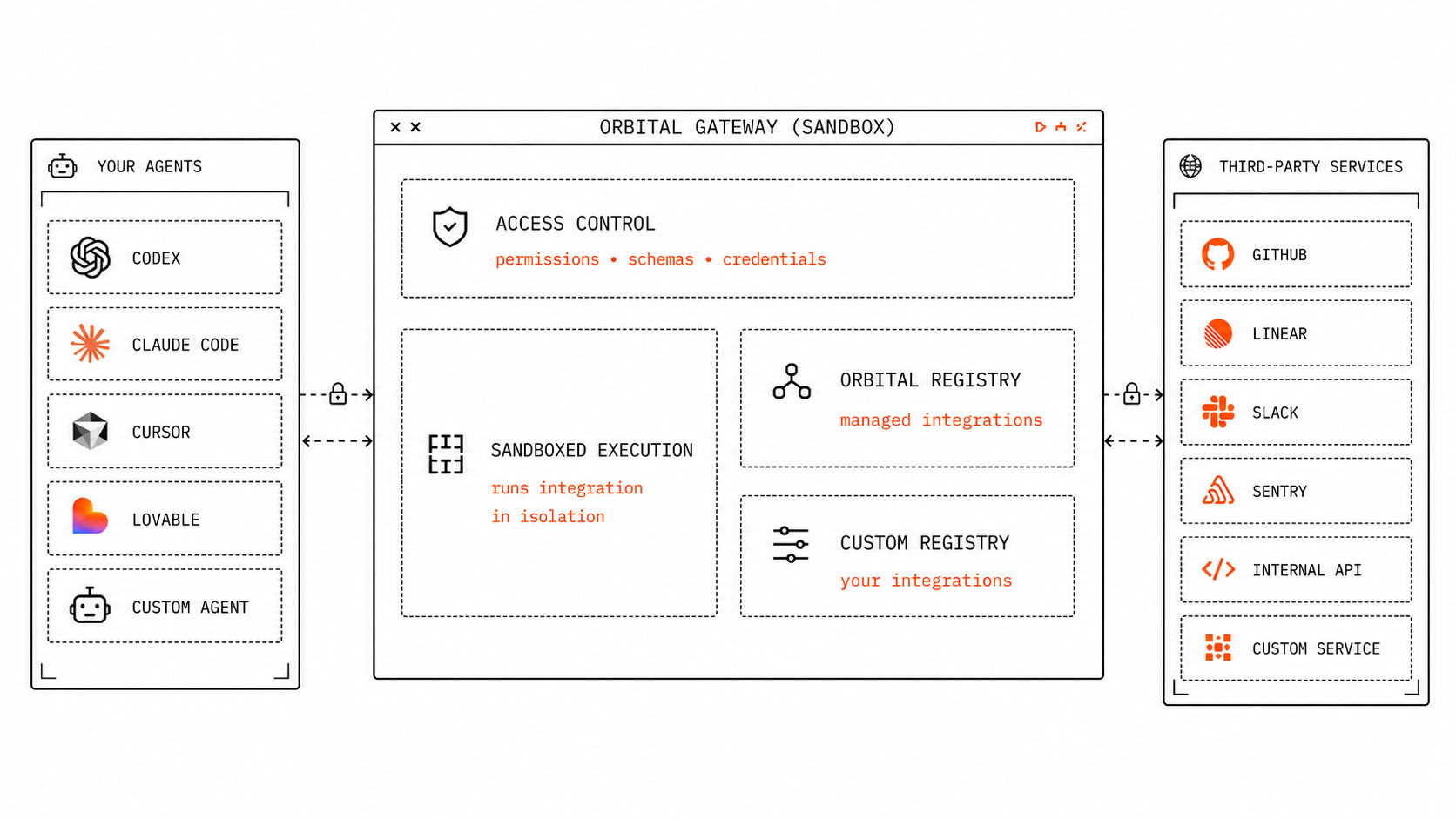
Bring internal APIs, customer-specific services, private MCP servers, or your own versions of managed integrations to Orbital Gateway.
Orbital Gateway
Orbital Gateway lets you securely connect agents to third-party services. Agents call typed integration commands. Credentials stay in the gateway. Integration code runs in a sandbox.
Works with every agent
 Claude Code
 Codex
Codex Cursor
 OpenCode
 OpenClaw
 LovableClaude CodeCodexCursorOpenCodeOpenClawLovableClaude CodeCodexCursorOpenCodeOpenClawLovableClaude CodeCodexCursorOpenCodeOpenClawLovableClaude CodeCodexCursorOpenCodeOpenClawLovableClaude CodeCodexCursorOpenCodeOpenClawLovable
Orbital Gateway takes care of access control, registries, and sandboxed execution so your agents can use provider systems without seeing credentials or owning integration security.
const result = await gateway.commands.run("linear.createIssue", {
  input: {
    title: "Follow up with Acme",
    priority: "high",
  },
})
Managed integrations
 Linear
 Google Workspace
 Stripe
 Slack
Slack GitHub
 Salesforce
Bring internal APIs, customer-specific services, private MCP servers, or your own versions of managed integrations to Orbital Gateway.
Use the Orbital Gateway API to manage connections, registries, permissions, and logs inside your own product UI.
Use Orbital Cloud or deploy it yourself so customer credentials and integration code stay behind the right boundary.
Connect agents to your customers' apps, APIs, and internal systems.
Ship preconfigured integrations your users can connect out of the box.
Build custom connectors for internal APIs, private tools, and customer-specific workflows.
Let customers connect, update, and disconnect their own app accounts.
Expose each connector to your agent through MCP, your product API, or both.
Limit agents to approved actions instead of giving them full API access.
Keep OAuth tokens and API keys in Orbital Gateway, not in your agent or app.
Manage every agent integration from one place: credentials, permissions, logs, and key rotation.
Yes. Orbital Gateway is built for agent-callable integrations. Agents connect through MCP or API, discover available integrations from your registries, and call typed commands without handling credentials directly.
Orbital Gateway can expose integrations through MCP, but it is more than an MCP server. It is a gateway, registry, and execution layer for agent-callable integrations.
No. Use the Orbital Registry for a growing catalog of managed integrations, or bring your own integrations through Your Custom Registry.
Credentials stay in Orbital Gateway. Agents call integration commands; they do not receive API keys, OAuth tokens, or raw provider access.
Internal APIs, customer systems, private MCP servers, OpenAPI specs, GraphQL APIs, and custom integrations.
Composio and Pipedream help you connect apps and automate workflows. Orbital Gateway helps agent products expose integrations safely. Your agents call typed integration commands through a gateway; credentials stay out of the agent runtime; custom integrations run in a sandbox; and teams can use Orbital Cloud or deploy it themselves.
Yes. Use Orbital Cloud or deploy Orbital Gateway in your own environment.
Teams building agentic products that need safe, repeatable integrations with company or customer services.